
Registering satellite radio
 Select Audio in the main function bar by
sliding
Select Audio in the main function bar by
sliding  and turning
 the COMAND
controller and press
the COMAND
controller and press  to confirm.
Select Sat. Radio and press
to
confirm.
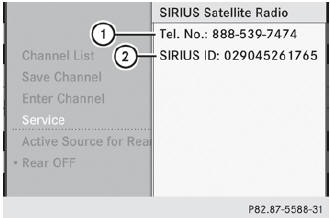
Service information screen
1 Provider's phone number (SIRIUS XM)
2 SIRIUS XM ID of your satellite receiver
Call the phone number of your satellite
radio provider shown on the screen.
 You can also have the satellite service
activated online. To do so, visit the SIRIUS
XM Radio website at
http://www.sirius.com (USA) or
http://www.siriuscanada.com
(Canada).
You can also have the satellite service
activated online. To do so, visit the SIRIUS
XM Radio website at
http://www.sirius.com (USA) or
http://www.siriuscanada.com
(Canada).
Once the connection has been established:
Follow the instructions of the service staff.
The activation process may take up to ten minutes. If the activation is completed successfully, the No Service message appears in the display, followed by the satellite radio main menu.
If registration is not included when
purchasing the system, your credit card
details will be required to activate your
account.
If the satellite receiver is not installed or is
not installed correctly, the Device not
available message will appear.
See also:
Premium-grade unleaded gasoline
To ensure the longevity and full performance of the engine, only premiumgrade
unleaded gasoline may be used. If there is no premium-grade unleaded gasoline available
and regular-grade unleaded ...
Closing
WARNING
To prevent possible personal injury, always
keep hands and fingers away from the trunk
opening when closing the trunk lid. Be
especially careful when small children are
around.
...
Important safety notes
Have the batteries changed at a qualified
specialist workshop.
WARNING
Batteries contain toxic substances.
Swallowing batteries can lead to serious
health issues or death.
Keep batteries ...