
HD Radio display
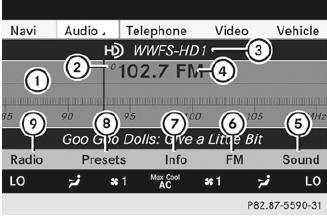
HD Radio display
1 Display/selection window with frequency display
2 Preset number
3 Name of the selected station with HD icon and program number
4 Station frequency
5 Sound settings
6 FM, AM or WB radio
7 Program information
8 Station presets
9 Radio functions
See also:
Important safety notes
WARNING
Only use roof racks approved by Mercedes- Benz for your vehicle model to avoid
damage to the vehicle.
Follow the manufacturer's installation instructions. Otherwise, an improperly ...
General notes
The HOLD function can assist the driver in the
following situations:
- when pulling away, especially on steep
slopes
- when maneuvering on steep slopes
- when waiting in ...
4MATIC: high-performance all-wheel-drive system with sophisticated control
systems
The 4MATIC powertrain at the heart of the Mercedes-Benz GLK-Class is one of
the most capable all-wheel-drive systems on the market. The driving dynamics
systems ESP®, ASR and 4ETS are superbly har ...