
Connecting Bluetooth® devices
General information
Before using your Bluetooth® device with COMAND for the first time, you will need to connect it.
Connecting comprises:
• searching for a Bluetooth® device
• subsequently authorizing it
 A maximum of 15 devices can be available
for selection from the device list.
A maximum of 15 devices can be available
for selection from the device list.
More detailed information on suitable mobile phones and on connecting Bluetooth®- capable mobile phones to COMAND can be found on the Internet at http://www.mbusa-mobile.com. Or call the Mercedes-Benz Customer Assistance Center on 1-800-FOR-MERCedes(1-800-367-6372) (for the USA) or Customer Relations on 1-800-387-0100 (for Canada).
Searching for Bluetooth® devices
 Activate Bluetooth®.
Select Vehicle in the main function bar by
turning  the COMAND controller and
press
the COMAND controller and
press  to confirm.
Select System by turning
the
COMAND controller and press to
confirm.
Select Bluetooth by turning
the
COMAND controller and press to
confirm.
Select Search for Bluetooth Devices
and press to confirm.
Select Update and press to
confirm.
COMAND searches for Bluetooth® devices
within range. After a short while, the
Bluetooth® device list appears.
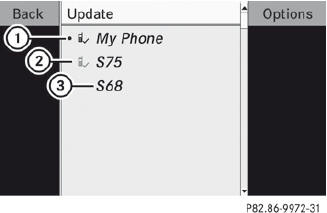
Example of display: Bluetooth® device list
1 Currently connected  and
authorized device (
and
authorized device ( icon)
icon)
2 Device not within range but previously authorized ( appears in gray)
3 Newly detected device in range, not yet authorized

The Bluetooth® device list shows all devices within range and all previously authorized devices, whether or not they are in range.
If the Bluetooth® device list is already full, you will be requested to de-authorize a device. If COMAND does not detect your Bluetooth® device, external authorization may be necessary.
Authorizing a Bluetooth® device (registering)
In the Bluetooth® device list, select not yet
authorized device 3 by turning the
COMAND controller.
Select Options by sliding  the
COMAND controller and press to
confirm.
the
COMAND controller and press to
confirm.
Select Authorize and press to
confirm.
or
Press to confirm the selected
device.
The input menu for the passcode appears.
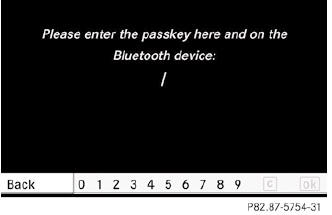
The passcode is any one to sixteen-digit number combination which you can choose yourself. You must enter the same number combination in COMAND and in the Bluetooth® device to be authorized (see mobile phone operating instructions).
Some mobile phones require a passcode
with four or more digits.
If you want to reauthorize a device
following de-authorization,
you can select a different passcode.
To enter a passcode in COMAND: press
the number keys in sequence.
 can be selected after the first
number
has been entered.
can be selected after the first
number
has been entered.
or
Select the digits one by one by turning
the COMAND controller and press
to confirm.
To confirm an entry in COMAND: select
using the COMAND controller and
press to confirm.
or
Select SEND on the telephone keypad.
Enter the same passcode into the
Bluetooth® device (see the operating
instructions for the respective device).
The device is authorized.
See also:
Compass
Calling up the compassInformation on operating the compass can be
found in the separate COMAND operating
instructions. ...
The M-Class also protects its occupants after a crash
As part of the POST-SAFE® functions, the new M-Class can activate a variety
of systems which can contribute towards avoiding post-accident risks. After a
more serious crash, the hazard warning lig ...
Useful information
This Operator's Manual describes all
models and all standard and optional
equipment of your vehicle available at the
time of publication of the Operator's
Manual. Country-specific differences ...