
Storing settings
With the memory function, you can store up to three different settings, e.g. for three different people.
The following settings are stored as a single memory preset:
• seat, backrest, head restraint position and contour of the backrest in the
lumbar region
• active multicontour seat: activated/deactivated
• multicontour seat: the side bolsters of the seat cushion and the backrest as
well as the contour of the backrest in the lumbar and shoulder regions
• driver's side: steering wheel position
• driver's side: position of the exterior mirrors on the driver's and
front-passenger sides
WARNING
Do not activate the memory function while
driving. Activating the memory function while
driving could cause the driver to lose control
of the vehicle.
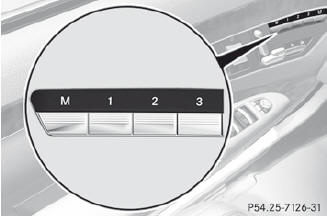
 Adjust the seat.
On the driver's side, adjust the steering
wheel and the exterior mirrors.
Press memory button M and then press
storage position button 1, 2 or 3 within
three seconds until you hear an
acknowledgment tone.
The settings are stored in the selected
storage position.
See also:
Setting the exterior mirrors
If the battery has been disconnected or
completely discharged, the exterior mirrors
must be reset. The exterior mirrors will
otherwise not fold in when you select the
"Fold in mirrors whe ...
Activating/deactivating Blind Spot Assist
You can use the Blind Spot Asst. function
to activate or deactivate Blind Spot Assist
or Active Blind Spot Assist.
Press
or
on the steering wheel
to select the DriveAssist menu.
Press
...
Useful information
This Operator's Manual describes
all
models and all standard and optional
equipment of your vehicle available at the
time of publication of the Operator's
Manual. Country-specific differenc ...