
Panic alarm
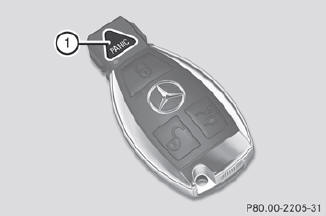
 To activate: press
  button 1 for at least one second.
An alarm sounds and the exterior lighting flashes.
To deactivate: press  button 1 again.
or
Insert the SmartKey into the ignition lock.
or
Press the KEYLESS-GO Start/Stop button.
The KEYLESS-GO key must be in the vehicle.
 USA only:
This device complies with Part 15 of the
FCC Rules. Operation is subject to the
following two conditions:
1. This device may not cause harmful
interference, and
2. this device must accept any interference
received, including interference that may
cause undesired operation.
Any unauthorized modification to this
device could void the user's authority to
operate the equipment.
The product label with FCC ID and IC
certification number can be found in the
battery case of the SmartKey.
Canada only:
This device complies with RSS-Gen of
Industry Canada. Operation is subject to
the following two conditions:
1. This device may not cause interference,
and
2. this device must accept any interference
received, including interference that may
cause undesired operation.
Any unauthorized modification to this
device could void the user's authority to
operate the equipment.
The product label with FCC ID and IC
certification number can be found in the
battery case of the SmartKey.
See also:
Removing the mechanical key
Push release catch 1 in the direction of
the arrow and at the same time, remove
mechanical key 2 from the SmartKey. ...
Important safety notes
WARNING
When expanding the cargo volume, always
fully fold the corresponding seats and, if so
equipped, always use the cargo net when
transporting cargo.
Unless you are transporting cargo, th ...
Vehicle Overview
Mercedes-Benz’s conventionally styled luxury sport utility vehicle gained a
larger 3.7-liter V-6 engine midway through the 2003 model year, which prompted
the automaker to change the designation o ...