
NECK-PRO luxury head restraints
 If you have difficulty resetting the NECKPRO
luxury head restraints, have this work
carried out at a qualified specialist
workshop, e.g. an authorized Mercedes-
Benz Center.
If you have difficulty resetting the NECKPRO
luxury head restraints, have this work
carried out at a qualified specialist
workshop, e.g. an authorized Mercedes-
Benz Center.
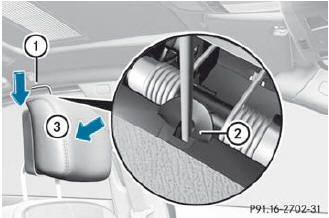
 Remove resetting tool 1 from the vehicle tool kit in the trunk.
Slide resetting tool 1 into guide 2 between the NECK-PRO luxury head restraint
and the rear cover of the head restraint.
Push resetting tool 1 downwards until you hear the head restraint deployment
mechanism engage.
Pull out resetting tool 1.
Firmly press the NECK-PRO luxury head restraint cushion back 3 until it
engages.
Repeat this procedure for the second NECK-PRO luxury head restraint.
Put resetting tool 1 back into the vehicle tool kit.
See also:
Important safety notes
WARNING
Do not adjust the steering wheel while driving.
Adjusting the steering wheel while driving, or
driving without the steering wheel adjustment
feature locked could cause the driver to los ...
Restarting the tire pressure loss warning system
Restart the tire pressure loss warning system
if you have:
• changed the tire pressure
• changed the wheels or tires
• mount new wheels or tires
Before restarting, consult the Tire and
...
Roadside Assistance button
Press and hold Roadside Assistance
button 1 for more than two seconds. This initiates a call to the Mercedes-Benz
Customer Assistance Center. The indicator lamp in Roadside Assistance but ...