
Vehicle level
Important safety notes
Your vehicle regulates its height automatically. All-round self-leveling ensures the best possible suspension and constant ground clearance, even with a laden vehicle.
When you drive fast, the vehicle is lowered automatically to improve driving safety and to reduce fuel consumption.
The following vehicle levels are possible:
- normal
- raised: the vehicle is raised by about 0.80 in
(20 mm) when compared with the normal
level
- lowered: the vehicle is lowered by about
0.40 in (10 mm) when compared with the
normal level
The "Normal" and "Raised" vehicle levels can be set manually.
The "Lowered” vehicle level is set automatically:
- at speeds above 70 mph (113 km/h)
- if you have selected "Sports tuning"
Setting the vehicle level
Select the "Normal" setting for normal road surfaces and "Raised" for driving with snow chains or on particularly poor road surfaces.
Your selection remains stored even if you remove the SmartKey from the ignition lock.
 WARNING
To help avoid personal injury, keep hands and
feet away from wheel housing area, and stay
away from under the vehicle when lowering
the vehicle chassis.
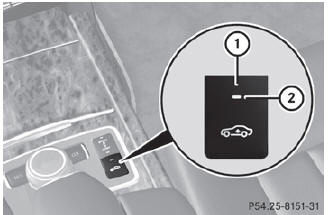
Setting raised level
•► Start the engine.
If indicator lamp 2 is not lit:
•► Press button 1.
Indicator lamp 2 lights up. The vehicle height is adjusted to raised level.
The Vehicle rising message appears in the display.
The "Raised level" setting is canceled if you:
- drive at speeds above approximately
75 mph (120 km/h)
- drive about 3 minutes at speeds above
50 mph (80 km/h)
The "Raised level" remains active when you are not driving within these speed ranges.
Setting the normal level
•► Start the engine.
If indicator lamp 2 is lit:
•► Press button 1.
Indicator lamp 2 goes out. The vehicle is adjusted to normal level.
See also:
EBD (electronic brake forcedistribution)
Observe the "Important safety notes"
section.
EBD monitors and controls the brake
pressure on the rear wheels to improve
driving stability while braking.
WARNING
If EBD ...
General notes
USA only:
This device complies with Part 15 of the
FCC Rules. Operation is subject to the
following two conditions:
1. This device may not cause harmful
interference, and
2. this device must ...
Transmission position D with ECO
start/stop function activated
The ECO start/stop function switches the
engine off automatically if the vehicle is
braked to a standstill when in transmission
position D and the brake is still depressed.
For further informat ...