
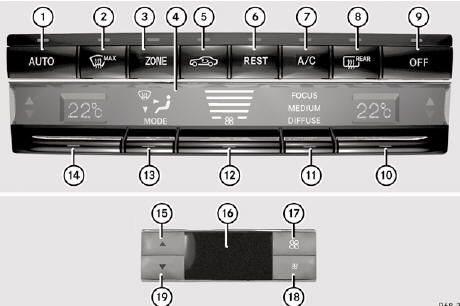
Control panel for 3-zone automatic climate control
Canada only
Front control panel
1. To set climate control to automatic
2. To defrost the windshield
3. To switch the ZONE function on/off
4. Display
5. To activate/deactivate air-recirculation mode
6. To activate/deactivate the residual heat function
7. To activate/deactivate cooling with air dehumidification
8. To switch the rear window defroster on/off
9. To switch climate control on/off
10. To set the temperature, right
11. To set climate control to automatic (FOCUS/MEDIUM/DIFFUSE)
12. To set the airflow
13. To set the air distribution
14. To set the temperature, left
Rear control panel
15. To increase the temperature
16. Display
17. To increase the airflow
18. To reduce the airflow
19. To reduce the temperature
See also:
Setting and storing the parking position
You can position the front-passenger side
exterior mirror in such a way that you can see
the rear wheel on that side as soon as you
engage reverse gear. You can store this
position.
Make s ...
Increasing the volume
In some cases, the volume of the AUX device
may be quieter or louder, or the usual
maximum possible volume cannot be
reached. On some devices, it is possible to
adjust the volume separately. I ...
AMG vehicles with rear axle locking
differential
Your vehicle is equipped with a self-locking
differential on the rear axle. For better
protection of the differential on the rear axle,
carry out an oil change after a breaking-in
phase of 200 ...