
Locking the vehicle (mechanical key)
If the vehicle can no longer be locked with the SmartKey, use the mechanical key.
•► Open the driver's door.
•► Close the front-passenger door, the rear
doors and the trunk lid/tailgate.
•► Press the locking button.
•► Check whether the locking knobs on the
front-passenger door and the rear doors
are still visible. Press down the locking
knobs by hand, if necessary.
•► Close the driver's door.
•► Take the mechanical key out of the
SmartKey
•► Insert the mechanical key into the lock of
the driver's door as far as it will go.
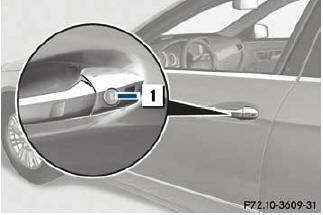
•► Turn the mechanical key clockwise as far
as it will go to position 1.
•► Turn the mechanical key back and remove
it.
•► Make sure that the doors and the trunk lid/
tailgate are locked.
•► Insert the mechanical key into the
SmartKey.
See also:
Capacities
Missing values were not available at time of going to print.
...
Service for recovering a stolen vehicle
If your vehicle has been stolen:
► Notify the police.
The police will issue a numbered incident
report.
► This number will be forwarded to the
Mercedes-Benz Customer Assistance
C ...
Lights
Switching the daytime running lamps on/
off
This function is not available in Canada.
If you have activated the Day Lights
function and the light switch is in the
or
position, the daytime r ...