
Panic alarm
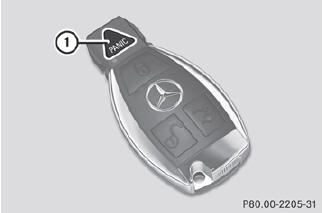
•► To activate: press  button 1 for at
least one second.
button 1 for at
least one second.
An alarm sounds and the exterior lighting flashes.
•► To deactivate: press  button 1
again.
button 1
again.
or
•► Insert the SmartKey into the ignition lock.
or
•► Press the KEYLESS-GO Start/Stop button.
The KEYLESS-GO key must be in the
vehicle.
USA only:
This device complies with Part 15 of the
FCC Rules. Operation is subject to the
following two conditions:
1. This device may not cause harmful interference, and 2. this device must accept any interference received, including interference that may cause undesired operation.
Any unauthorized modification to this device could void the user's authority to operate the equipment.
The product label with FCC ID and IC certification number can be found in the battery case of the SmartKey.
Canada only:
This device complies with RSS-Gen of
Industry Canada. Operation is subject to
the following two conditions:
1. This device may not cause interference, and 2. this device must accept any interference received, including interference that may cause undesired operation.
Any unauthorized modification to this device could void the user's authority to operate the equipment.
The product label with FCC ID and IC certification number can be found in the battery case of the SmartKey.
See also:
General notes
WARNING
All categories of messages contain important information which should be taken
note of and,
where a malfunction is indicated, addressed as soon as possible at an authorized
Mercedes-B ...
Search & Send
"Search & Send" is a destination entry service. You can find further information
on "Search & Send" in the separate COMAND operating instructions. ...
Displaying details
Select Data/Connections in the
telephone basic menu by sliding and
turning the COMAND controller and
press to confirm.
Select Bluetooth Telephones and press
to confirm.
Select the des ...