
Instruction labels for tires and loads
WARNING
Do not overload the tires by exceeding the
specified load limit as indicated on the Tire
and Loading Information placard on the
driver's door B-pillar. Overloading the tires
can overheat them, possibly causing a
blowout. Overloading the tires can also result
in handling or steering problems, or brake
failure.
Two instruction labels on your vehicle show the maximum possible load.
(1) The Tire and Loading Information placard on the B-pillar on the driver's side. The Tire and Loading Information placard shows the maximum permissible number of occupants and the maximum permissible vehicle load. It also contains details of the tire sizes and corresponding pressures for tires mounted at the factory.
(2) The vehicle identification plate is on the B-pillar on the driver's side. The vehicle identification plate informs you of the gross vehicle weight rating. It is made up of the vehicle weight, all vehicle occupants, the fuel and the cargo. You can also find information about the maximum gross axle weight rating on the front and rear axle.
The maximum gross axle weight rating is the maximum weight that can be carried by one axle (front or rear axle). Never exceed the maximum load or the maximum gross axle weight rating for the front or rear axle.
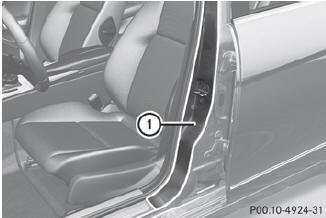
1 B-pillar, driver's side
See also:
Folding the seat backrest back
Folding the seat backrest back
Move the driver's or
front-passenger seat
forward if necessary.
Make sure that the seat belt
does not
become trapped when folding the rear seat
backrest ...
Underinflated tires
WARNING
Follow recommended tire inflation pressures.
Do not underinflate tires. Underinflated tires
wear excessively and/or unevenly, adversely
affect handling and fuel economy, and are
more ...
Safety systems
Display messages
(USA only)
(Canada only) The red brake system
warning lamp comes on
while the engine is
running. A warning tone
also sounds.
Possible causes/consequences and ►
Soluti ...