
Introduction
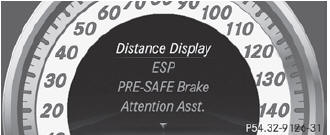
In the DriveAssist. menu you can:
• show the distance display
• activate/deactivate ESP®
• activate/deactivate PRE-SAFE® Brake
• activate/deactivate ATTENTION ASSIST
• activate/deactivate Blind Spot Assist or Active Blind Spot Assist
• activate/deactivate Lane Keeping Assist or Active Lane Keeping Assist
See also:
Emergency call
Important safety notes
A license agreement must exist
in order
to activate the mbrace service. Ensure that
your system is activated and ready for use,
and press the MB Info call button to
...
Call priority
When service calls are active, e.g. Roadside
Assistance or MB Info calls, an emergency
call can still be initiated. In this case, an
emergency call will take priority and override
all other ac ...
Climate control
Different temperatures can be set for the
driver's and front-passenger sides.
- Turn the SmartKey to position 2 in the
ignition lock.
- To increase/reduce: turn controls 1 and
6 clockwise or c ...