
Route guidance active
No change of direction announced
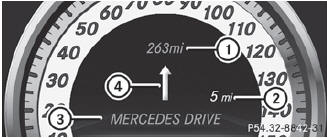
No change of direction announced
1 Distance to the destination
2 Distance to the next change of direction
3 Current road
4 Symbol for "follow the road's course"
Change of direction announced without a lane recommendation

Change of direction announced without a lane recommendation
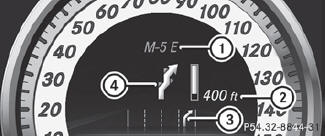
1 Road into which the change of direction leads
2 Distance to change of direction and visual distance display
3 Current road
4 Symbol for change of direction
When a change of direction has been announced, you will see visual distance display 2 next to the symbol for change of direction 4. This decreases in size as you approach the announced change of direction.
Change of direction announced with a lane recommendation
Lane recommendations are only displayed if the relevant data is available on the digital map.
Change of direction announced with a lane recommendation
1 Road into which the change of direction leads
2 Distance to change of direction and visual distance display
3 Lane recommendation
4 Symbol for change of direction
On multi-lane roads, lane recommendation 3 may be shown for the next change of direction. Lanes may be added during a change of direction.
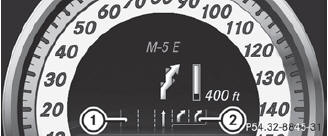
Lane recommendation display (example)
1 Uninterrupted lane
2 New lane during a change of direction
See also:
Cleaning the seat covers
Do not use microfiber cloths to clean
genuine leather, artificial leather or
Alcantara® covers. If used often, these can
damage the cover.
Observe the following when cleaning:
• clean genu ...
Cleaning the headliner and carpets
Roof lining: use soft brushes or dry
shampoo if it is particularly dirty.
Carpets: use carpet and textile cleaners
that have been approved and
recommended by Mercedes-Benz. ...
Drinking and driving
WARNING
Drinking and driving and/or taking drugs and
driving are very dangerous combinations.
Even a small amount of alcohol or drugs can
affect your reflexes, perceptions and
judgment.
T ...