
Trip computer "From start" or "From reset"
The values in the From Start submenu are calculated from the start of a journey, while the values in the From Reset submenu are calculated from the last time the submenu was reset.
 Press the
 or
or
 button on the
steering wheel to select the Trip menu.
button on the
steering wheel to select the Trip menu.
Press the
 or
or
 button to select
From Start or From Reset.
button to select
From Start or From Reset.
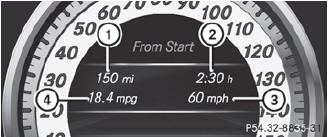
Trip computer "From start" (example)
1 Distance
2 Time
3 Average speed
4 Average fuel consumption
The From Start trip computer is reset automatically if:
• the ignition has been switched off for more than four hours.
• 999 hours have been exceeded.
• 9,999 miles have been exceeded.
When 9,999 hours or 99,999 miles have been exceeded, the trip computer is automatically reset From Reset.
See also:
SmartKey
0. To remove the SmartKey
(shift the transmission to position P)
1. Power supply for some consumers, such
as the windshield wipers
2. Ignition (power supply for all consumers)
and driv ...
Proper use
WARNING
There are various warning stickers affixed to
your vehicle. Their purpose is to alert you and
others to various dangers. Therefore, do not
remove any warning stickers unless the
sti ...
Side impact air bags
WARNING
The pressure sensors for side impact air bag
control are located in the doors. Do not
modify any components of the doors or door
trim panels including, for example, the
addition of ...