
Warning displays
The warning displays show the distance between the sensors and the obstacle. The warning display for the front area is located on the dashboard above the center air vents.
The warning display for the rear area is located on the headliner in the rear compartment.
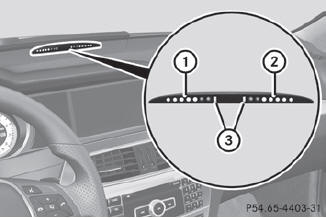
Warning display for the front area
1 Segments on the left-hand side of the vehicle
2 Segments on the right-hand side of the vehicle
3 Segments showing operational readiness
The warning display for each side of the vehicle is divided into five yellow and two red segments. PARKTRONIC is operational if yellow segments showing operational readiness 3 light up.
The selected transmission position determines which warning display is active when the engine is running.
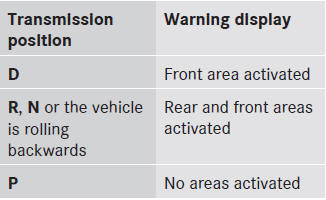
One or more segments light up as the vehicle approaches an obstacle, depending on the vehicle's distance from the obstacle.
From the:
• sixth segment onwards, you will hear an
intermittent warning tone for
approximately two seconds.
• seventh segment onwards, you will hear a
warning tone for approximately two
seconds. This indicates that you have now
reached the minimum distance.
See also:
CD/DVD drive and AUX jacks
The CD/DVD drive is located in the center
behind the front seats.
1 CD/DVD slot
2 AUX, right-hand (R) jack for audio signal
3 AUX, left-hand (L) jack for audio signal
4 AUX, jack for vid ...
KEYLESS-GO
General information
Vehicles with KEYLESS-GO are equipped with
a SmartKey featuring an integrated KEYLESSGO
function and a detachable Start/Stop
button.
The Start/Stop button must be inserted ...
Adjusting the head restraints
electrically
- To adjust the head restraint height: slide
the switch for head restraint adjustment
up or down in the direction of
the arrow. ...