
3-zone automatic climate control
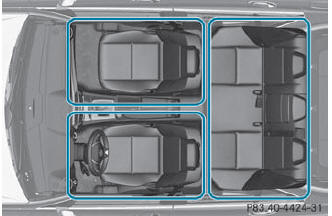
Automatic climate control climate zones
You can select different temperature settings for the driver's and front-passenger sides as well as for the rear compartment.
 Turn the SmartKey to position
2 in the ignition lock.
Turn the SmartKey to position
2 in the ignition lock.
To increase/reduce the
temperature in
the front: turn controls 1 and 6
clockwise or counter-clockwise.
Only change the temperature setting in
small increments. Start at 72 °F (22 °C).
To increase/reduce the
temperature in
the rear compartment using the front
control panel: press the  button.
The indicator lamp in the  button
goes
out.
button
goes
out.
Turn control 1 clockwise or
counterclockwise. Only change the temperature setting in small increments. Start
at 72 °F (22 °C).
To increase/reduce the
temperature in
the rear compartment using the rear
control panel: press the  or
or
 button on the rear control panel.
Only change the temperature setting in
small increments. Start at 72 °F (22 °C).
 If you leave the vehicle parked
for longer
than 30 minutes, the temperature setting
for the rear compartment then switches
back to 22 °F.
If you leave the vehicle parked
for longer
than 30 minutes, the temperature setting
for the rear compartment then switches
back to 22 °F.
See also:
Tires
Display messages
USA only:
The yellow tire pressure
monitor warning lamp
(pressure loss/
malfunction) is lit.
Possible causes/consequences and ►
Solutions
Risk of accident
The tire ...
Cleaning the exterior lighting
Clean the plastic lenses of the exterior
lights with a wet sponge and a mild cleaning
agent, e.g. Mercedes-Benz car shampoo or
cleaning cloths.
Only use cleaning agents or cleaning
cloths w ...
Active safety: New assistance for drivers
Avoiding accidents and reducing the consequences of accidents: this is the
comprehensive approach adopted by Mercedes-Benz in its safety research and
referred to collectively by the company as &qu ...