
Storing settings
With the memory function, you can store up to three different settings, e.g. for three different people.
The following settings are stored as a single memory preset:
• position of the seat, backrest and head restraint
• driver's side: steering wheel position
• driver's side: position of the exterior mirrors on the driver's and
front-passenger sides
WARNING
Do not activate the memory function while
driving. Activating the memory function while
driving could cause the driver to lose control
of the vehicle.
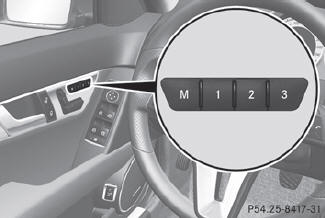
 Adjust the seat.
On the driver's side, adjust the
steering wheel and the exterior mirrors.
Press memory button M and
one of the storage position buttons 1, 2 or 3 within three
seconds.
The settings are stored in the selected preset position. A tone sounds when the
settings have been completed.
See also:
Driving on flooded roads
Do not drive through flooded areas. Check the depth of any water before driving
through it. Drive slowly through standing water. Otherwise, water may enter the
vehicle interior or the engine co ...
Activating/deactivating
Turn the SmartKey to position 2
in the ignition lock.
To switch on: press the
button. The indicator lamp in the
button lights up. Airflow and air
distribution are set to automatic mode.
or ...
Roadside Assistance button
•► Press and hold Roadside Assistance
button 1 for more than two seconds.
This initiates a call to the Mercedes-Benz
Customer Assistance Center. The indicator
lamp in Roadside Assistanc ...