
Switching on/off
WARNING
Repeatedly setting the seat heating to level
3 may result in excessive seat temperatures.
The health of passengers that have limited
temperature sensitivity or a limited ability to
react to excessively high temperatures may
be affected or they may even suffer burn-like
injuries. Therefore, do not use seat heating
level 3 repeatedly.
The three red indicator lamps in the button indicate the heating level you have selected.
 If the battery voltage is too
low, the seat
heating may switch off.
If the battery voltage is too
low, the seat
heating may switch off.
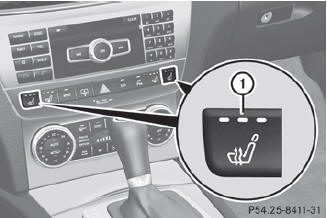
Driver's and front-passenger seat
The system automatically switches down from level 3 to level 2 after approximately eight minutes.
The system automatically switches down from level 2 to level 1 after approximately ten minutes.
The system automatically switches off approximately 20 minutes after it is set to level 1.
 Make sure that the SmartKey is
in position 1 or 2 in the ignition lock.
Make sure that the SmartKey is
in position 1 or 2 in the ignition lock.
To switch on: press button 1
repeatedly until the desired heating level is set.
To switch off: press button
1 repeatedly until all the indicator lamps go out.
See also:
Switching on Night View Assist Plus
You can only activate Night View Assist Plus if:
• the SmartKey is in position 2 in the ignition lock.
• it is dark.
• the light switch is in the or
position.
• reverse gear has not b ...
Setting the glove box air vent
When automatic climate control is activated, the glove box can be ventilated,
for instance to cool its contents. The level of airflow depends on the airflow and
air distribution settings.
Clos ...
Cleaning the wheels
WARNING
Do not use power washers with circular-jet nozzles (dirt grinders) to clean your
vehicle, in particular the tires. You could otherwise damage the tires and cause
an accident. ...