
Operating the panorama roof with power tilt/sliding panel
Opening and closing
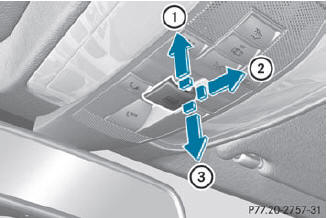
Overhead control panel
1 To raise
2 To open
3 To close/lower
The panorama roof with power tilt/sliding panel can only be operated when the roller sunblind is open.
 Turn the SmartKey to position 1
or 2 in the ignition lock.
Turn the SmartKey to position 1
or 2 in the ignition lock.
Push or pull the
 switch in the corresponding
direction.
switch in the corresponding
direction.
 If you press the
switch beyond the
point of resistance, an automatic opening/closing process is started in the
corresponding direction. You can stop
automatic operation by operating the
switch again.
If you press the
switch beyond the
point of resistance, an automatic opening/closing process is started in the
corresponding direction. You can stop
automatic operation by operating the
switch again.
When raising the roof, automatic operation
is only available if the panorama roof with
power tilt/sliding panel is in the closed
position.
See also:
Vehicle operation outside the USA and Canada
If you plan to operate your vehicle in foreign
countries, please be aware that:
• service facilities or replacement parts may
not be readily available.
• unleaded fuel for vehicles with a ca ...
SmartKey
Display messages
Possible causes/consequences and
Solutions
You have put the wrong SmartKey in the ignition lock.
Use the correct SmartKey.
The SmartKey ...
Multifunction display
Values and settings as well as display
messages are shown in the multifunction
display.
1. Description field
2. Menu bar
3. Drive program
4. Transmission position
5. Outside tem ...