
Unlocking the driver's door (mechanical key)
If the vehicle can no longer be unlocked with the SmartKey, use the mechanical key.
If you use the mechanical key to unlock and open the driver's door, the anti-theft alarm system will be triggered.
 Take the mechanical key out of
the SmartKey.
Take the mechanical key out of
the SmartKey.
Insert the mechanical key into the
lock of the driver's door as far as it will go.
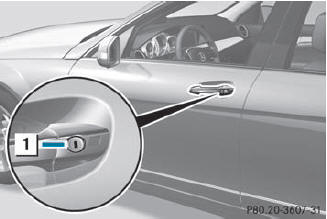
Turn the mechanical key
counterclockwise to position 1.
The door is unlocked.
Turn the mechanical key back and
remove it.
Insert the mechanical key into the
SmartKey.
See also:
Important safety notes
WARNING
When leaving the vehicle, always remove the
SmartKey from the ignition lock. Always take
the SmartKey with you and lock the vehicle.
Do not leave children unattended in the
vehicle ...
Important safety notes
WARNING
Always remember that you must concentrate primarily on driving the vehicle. The
driver's concentration must always be directed primarily at road traffic. For your
own safety and ...
Inserting and removing a CD/DVD
Proceed as described in the "Audio CD/DVD and MP3 mode" section. ...