
Changing the battery
You require a CR 2025 3 V cell battery.
 Take the mechanical key out of
the
SmartKey.
Take the mechanical key out of
the
SmartKey.
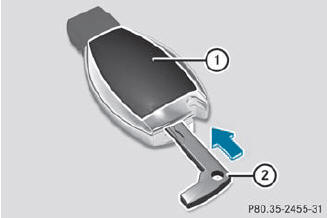
Press mechanical key 2 into the
opening
in the SmartKey in the direction of the arrow until battery tray cover 1 opens.
When doing so, do not hold cover 1 shut.
Remove battery tray cover 1.
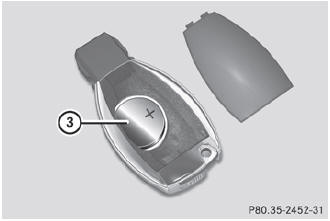
Repeatedly tap the SmartKey
against your palm until battery 3 falls out.
Insert the new battery with the
positive terminal facing upwards. Use a lint-free cloth to do so.
Make sure that the surface of the
battery is free from lint, grease and all other forms of contamination.
Insert the front tabs of battery
tray cover 1 and then press to close it.
Insert the mechanical key into the
SmartKey.
Check the function of all SmartKey
buttons on the vehicle.
See also:
Heavy and light loads
WARNING
Depressing the brake pedal constantly results
in excessive and premature wear to the brake
pads.
It may also cause the brakes to overheat,
seriously impairing their effectiveness. It ...
Vanity mirror in the sun visor
Mirror light 1 only functions if the sun visor is clipped into retainer 2 and
mirror cover 5 has been folded up. ...
Important safety notes
WARNING
When leaving the vehicle, always remove the
SmartKey from the ignition lock. Always take
the SmartKey with you and lock the vehicle.
Do not leave children unsupervised in the
vehicle ...