
Selecting a radio station
 SIRIUS XM satellite radio acts like a
normal radio.
SIRIUS XM satellite radio acts like a
normal radio.
For more information on satellite radio
operation, see the separate operating
instructions.
You can only change the waveband and store
new stations using COMAND.
– Switch on COMAND and select Radio (see
the separate operating instructions).
– Press the  or
or
 button on the
steering wheel to select the Audio menu.
button on the
steering wheel to select the Audio menu.
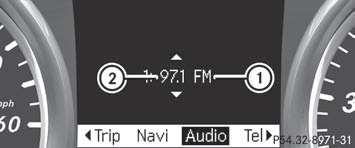
1 Waveband
2 Station
– To select a stored station: briefly press
the  or
or
 button.
– To select a station from the station
list: press and briefly hold the or
button.
– To select a station using station
search: press and briefly hold the
or button.
See also:
Limited Warranty
Follow the instructions in this manual
about the proper operation of your vehicle
as well as about possible vehicle damage.
Damage to your vehicle that arises from
culpable contraventions again ...
Occupant distribution
The distribution of occupants in a vehicle at
their designated seating positions. ...
Starting procedure with the SmartKey
To start the engine using the SmartKey
instead of KEYLESS-GO, pull the Start/Stop button out of the ignition lock.
To start a gasoline engine: turn the
SmartKey to position 3 in the ignition lo ...