
Important safety notes
In addition to the illumination provided by the normal headlamps, Night View Assist Plus uses infrared light to illuminate the road. The Night View Assist Plus camera picks up the infrared light and displays a grayscale image in COMAND. The image displayed in COMAND corresponds to a road lit up by highbeam headlamps. This enables you to see the road's course and any obstacles in good time.
If pedestrian recognition is activated, pedestrians recognized by the system are highlighted in the Night View Assist Plus display.
 WARNING
Night View Assist Plus is only an aid designed
to assist driving. It is not a substitute for
attentive driving. Do not rely solely on the
Night View Assist Plus display. Continue to
look through the windshield. You are
responsible for safety and must drive in
accordance with traffic conditions. You could
otherwise put yourself and others in danger.
The system may be impaired or unavailable if:
- there is poor visibility, e.g. due to snow, rain, fog or heavy spray.
- the windshield is dirty, fogged up or covered, for instance by a sticker, in
the vicinity of the camera.
- you are driving on bends, uphill gradients or downhill gradients.
Light from the headlamps of oncoming vehicles does not affect the Night View Assist Plus display in the multifunction display. This is also the case if you cannot switch on the high-beam headlamps due to oncoming traffic.
WARNING
The Night View Assist Plus cannot record
objects immediately in front of or next to the
vehicle. When maneuvering, continue to look
through the windshield. Make sure no
persons or animals are in the area in which
you are maneuvering. You could otherwise
injure them.
 Infrared light is not visible to the human
eye and therefore does not glare. Night
View Assist Plus can therefore remain
switched on even if there is oncoming
traffic.
Infrared light is not visible to the human
eye and therefore does not glare. Night
View Assist Plus can therefore remain
switched on even if there is oncoming
traffic.
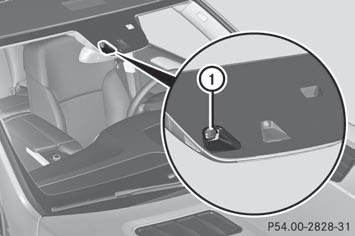
1 Night View Assist Plus camera
See also:
BAS (Brake Assist System)
Observe the "Important safety notes"
section.
BAS operates in emergency braking
situations. If you depress the brake pedal
quickly, BAS automatically boosts the braking
force, thus s ...
Displaying service messages
•► Switch on the ignition.
•► Press on the steering wheel
to select the Serv. menu.
•► Press to select the ASSYST
PLUS submenu and press to confirm.
The service due date ap ...
Operating audio player or audio media
Audio data from various audio devices or
media can be played, depending on the
equipment installed in the vehicle.
•► Switch on COMAND and select the audio
device or medium (see the separ ...