
Activating the HOLD function
– Make sure that the activation conditions
are met.
– Depress the brake pedal.
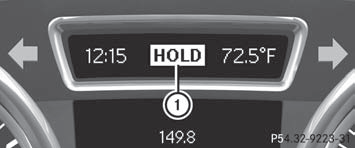
– Quickly depress the brake pedal further
until HOLD display 1 appears in the
multifunction display.
The HOLD function is activated. You can
release the brake pedal.
 If depressing the brake pedal the first
time does not activate the HOLD function,
wait briefly and then try again.
If depressing the brake pedal the first
time does not activate the HOLD function,
wait briefly and then try again.
 WARNING
The vehicle's brakes are applied when the
HOLD function is activated. For this reason,
deactivate the HOLD function if the vehicle is
to be set in motion by other means (e.g. in a
car wash or by towing).
See also:
Guide lines in the COMAND display
WARNING
Use of rear view camera can be dangerous if
you are color-blind or have impaired color
vision.
Only use rear view camera if you can see and
distinguish all colored guidelines ...
Setting the temperature
Climate control climate zones
You can select different temperature settings
for the driver's and front-passenger sides as
well as for the left and right sides of the rear
compartment and the ...
Vehicle Overview
Mercedes-Benz’s conventionally styled luxury sport utility vehicle gained a
larger 3.7-liter V-6 engine midway through the 2003 model year, which prompted
the automaker to change the designation o ...