
Switching on/off
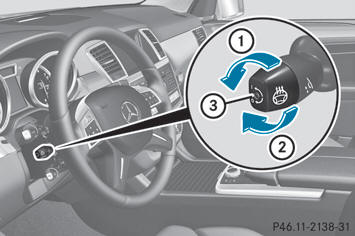
- Make sure that the SmartKey is in position
2 in the ignition lock.
- To switch on/off: turn the lever in the
direction of arrow 1 or 2.
Indicator lamp 3 lights up or goes out.
Vehicles without KEYLESS-GO: when you remove the key from the ignition lock, the steering wheel heating is deactivated.
Vehicles with KEYLESS-GO: when you switch off the ignition and open the driver's door, the steering wheel heating is deactivated.
See also:
Number of seats
The specifications shown on the Tire and
Loading Information placard in the
illustration are examples. The number of
seats is vehicle-specific and can differ from
the details shown. The numbe ...
Cleaning genuine wood and trim elements
Wipe the wooden trim and trim pieces with
a damp, lint-free cloth, e.g. a microfiber
cloth.
Heavy soiling: use car care and cleaning
products recommended and approved by
Mercede ...
Important safety notes
WARNING
Do not adjust the steering wheel while driving.
Adjusting the steering wheel while driving
could cause the driver to lose control of the
vehicle.
The electrical steering wheel adj ...