
Glare from the side
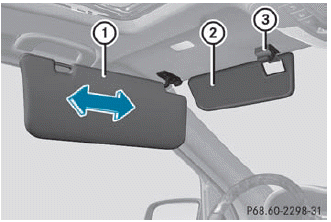
► Fold down sun visor 1.
► Pull sun visor 1 out of retainer 3.
► Swing sun visor 1 to the side.
► Vehicles with a sliding sunroof: slide sun
visor 1 horizontally as desired.
► Vehicles with a sliding sunroof: fold
down additional sun visor 2 to the
windshield.
See also:
Restarting the tire pressure monitor
WARNING
It is the driver's responsibility to set the tire
pressure to the recommended cold tire
pressure. Underinflated tires affect the ability
to steer or brake the vehicle. You migh ...
Problems with your vehicle
If you should experience a problem with your
vehicle, particularly one that you believe may
affect its safe operation, we urge you to
contact an authorized Mercedes-Benz Center
immediately to ...
Multifunction display
Values and settings as well as display
messages are shown in the multifunction
display.
1 Description field
2 Menu bar
3 Drive program
4 Outside temperature or speed
5 Transmission position ...