
Switching on/off
The three red indicator lamps in the button indicate the heating level you have selected.
 If the battery voltage is too low, the seat
heating may switch off.
If the battery voltage is too low, the seat
heating may switch off.
One or more of the indicator lamps in the seat heating button are flashing.
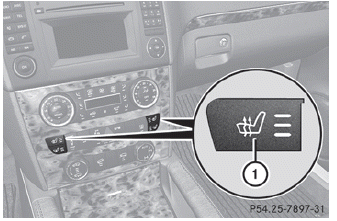
Driver's and front-passenger seat
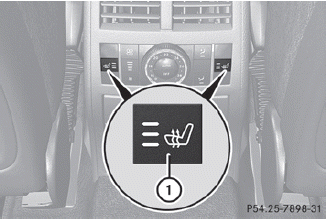
Rear seats
The system automatically switches down from level 3 to level 2 after approximately five minutes.
The system automatically switches down from level 2 to level 1 after approximately ten minutes.
The system automatically switches off approximately 20 minutes after it is set to level 1.
► Make sure that the SmartKey is in
position
2 in the ignition lock.
► To switch on: press button 1 repeatedly
until the desired heating level is set.
► To switch off: press button 1 repeatedly
until all the indicator lamps go out.
See also:
Weather Band
Switching on
Select the currently set waveband FM or
AM by sliding and turning
the
COMAND controller and press to
confirm.
Select WB from the menu and press
to
confirm.
1 Display ...
Changing gear
The automatic transmission shifts to the
individual gears automatically when it is in
transmission position D. This automatic
gearshifting behavior is determined by:
• a shift range restricti ...
Important safety notes
A license agreement must exist in order
to activate the mbrace service. Ensure that
your system is activated and ready for use,
and press the
MB Info call button to
register. If any o ...