
Opening and closing the sidewindows
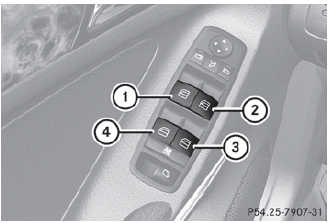
1 Front left
2 Front right
3 Rear right
4 Rear left
The switches for all side windows are located on the driver's door. There is also a switch on each door for the corresponding side window.
The switches on the driver's door take precedence.
 The side windows cannot be operated
from the rear when the override feature for
the side windows is activated.
The side windows cannot be operated
from the rear when the override feature for
the side windows is activated.
► Turn the SmartKey to position 1 or 2 in
the
ignition lock.
► To open: press the corresponding switch.
► To close: pull the corresponding switch.
If you press the switch beyond the point
of resistance, an automatic opening/closing process is started in the
corresponding direction. You can stop automatic operation by operating the
switch again.
You can continue to operate the side
windows after you switch off the engine or
remove the SmartKey. This function is
available for up to five minutes or until the
driver's or front-passenger door is opened.
See also:
Rear-end structure: side members with specifically graduated material
thicknesses
Multi-piece side members and a robust, flexible crossmember made from
ultra-high-strength steel form the key components of the rear-end structure. The
rear side members are continuous, closed box ...
Important safety notes
WARNING
To help avoid personal injury during a collision
or sudden maneuver, exercise care when
storing objects in the vehicle. Put luggage or
cargo in the trunk if possible.
Do not pile lug ...
Important safety notes
Important safety notes
Do not leave the SmartKey in the cargo
compartment. You could otherwise lock
yourself out
WARNING
When leaving the vehicle, always remove the
SmartKey from the ...