
Multifunction steering wheel
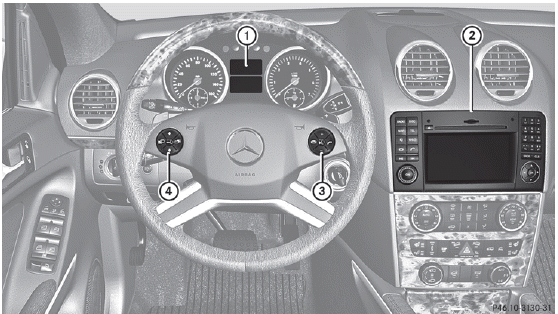
1 Multifunction display
2 COMAND; see the separate
operating instructions
3  Rejects or ends a call
Exits phone book/redial memory
 Makes or accepts a call
Switches to the redial
memory
 Selects submenus in the
Settings menu
Selects submenus in the
Settings menu
Changes values
Adjusts the volume
 Switches on the Voice
Control System; see the separate operating instructions
4  Selects a menu: scrolls back and forth
 Switches off the Voice
Control System; see the separate operating instructions
 Scrolls back and forth within a menu
See also:
Features & Pricing
Excluding the destination charge, the GL320 Bluetec starts at $58,200, while
the GL450 starts at $59,200. Both represent $3,000-plus increases over last
year's prices, though larger standard wheel ...
Programming the integrated garage
door opener on the rear-view mirror
Programming
WARNING
Only press the transmitter button on the
integrated garage door opener if there are no
persons or objects present within the sweep
of the garage door. People could otherwi ...
AMG vehicles with rear axle locking
differential
Your vehicle is equipped with a self-locking
differential on the rear axle. For better
protection of the differential on the rear axle,
carry out an oil change after a breaking-in
phase of 200 ...