
Displays and controls
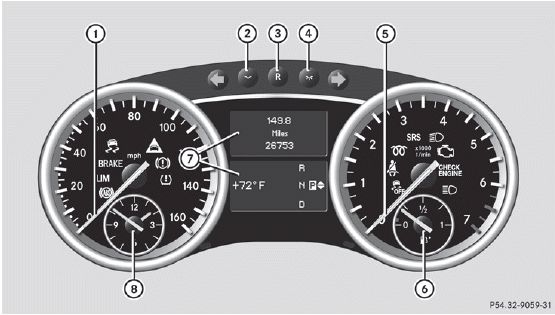
1 Speedometer with
segments
2 Adjusts the instrument
cluster lighting: dimmer
3 Reset button
4 Adjusts the instrument
cluster lighting: brighter
5 Tachometer
6 Fuel gauge
7 Multifunction display
8 Clock
See also:
Exhaust check
WARNING
Inhalation of exhaust gas is hazardous to your
health. All exhaust gas contains carbon
monoxide (CO), and inhaling it can cause
unconsciousness and possible death.
Do not run the engi ...
Sunblinds on the rear side windows
•► To extend: pull the roller sunblind out by
tab 1 and hook it onto retainers 2 at the
top of the window.
! Always guide the roller sunblind by hand.
Do not let it snap back suddenly as ...
Maximum load rating
WARNING
Do not overload the tires by exceeding the specified load limit as indicated
on the Tire and Loading Information placard on the driver's door B-pillar. Overloading
the tires can ...