
Menu overview
The number of menus shown depends on the optional equipment in the vehicle.
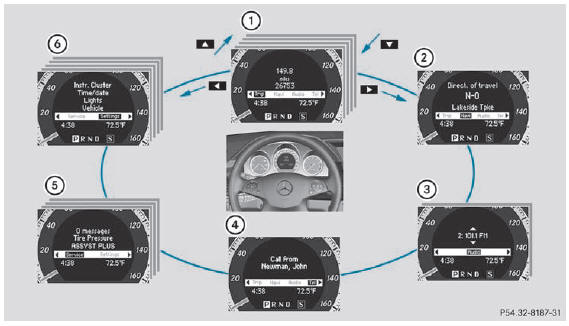
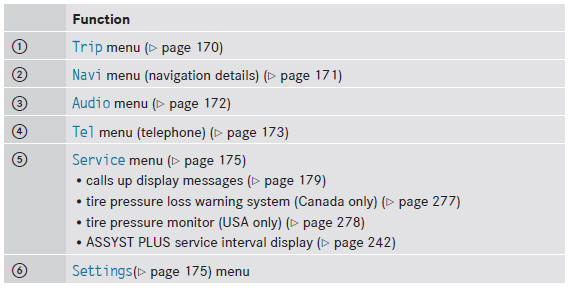
The Audio and Tel menus differ slightly in vehicles with an audio system and vehicles with COMAND. The examples given in this Operator's Manual apply to vehicles equipped with COMAND.
See also:
Automatic emergency braking when a collision is imminent
The well-proven, radar based assistance systems from the S-Class are now also
optionally available to Mercedes-Benz E-Class customers. A further development
of the long-range radar sensor now has ...
Problems with the sliding sunroof
Your vehicle may be equipped with a sliding
sunroof or a panorama roof with power tilt/sliding panel. In the following
section, the
term "sliding sunroof" refers to both types of
sli ...
Problems with the occupant classification system
Problem
Possible causes/consequences and
Solutions
The
indicator lamp illuminates and remains illuminated.
The person on the front-passenger seat:
• has the weig ...