
Warning displays
The warning displays show the distance between the sensors and the obstacle. The warning display for the front area is located on the dashboard above the center air vents. The warning display for the rear area is located on the headliner in the rear compartment.
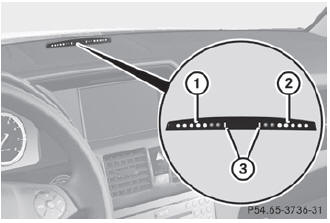
Warning display for the front area
- Segments on the left-hand side of the vehicle
- Segments on the right-hand side of the vehicle
- Segments showing operational readiness
The warning display for each side of the vehicle is divided into five yellow and two red segments. PARKTRONIC is operational if yellow segments showing operational readiness 3 light up.
The selected transmission position determines which warning display is active when the engine is running.
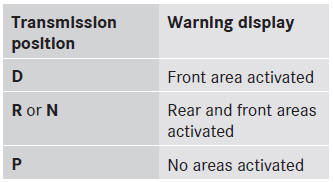
One or more segments light up as the vehicle approaches an obstacle, depending on the vehicle's distance from the obstacle. From the:
- sixth segment onwards, you will hear an intermittent warning tone for approximately two seconds.
- seventh segment onwards, you will hear a warning tone for approximately two seconds. This indicates that you have now reached the minimum distance.
See also:
Vehicle remote closing
If you forget to lock your vehicle but are no
longer in the vicinity of the vehicle, it can be
locked for you by the Mercedes-Benz
Customer Assistance Center.
The vehicle can be locked remotely ...
ATA (Anti-Theft Alarm system)
alarm system is armed and you open:
• a door
• the vehicle with the mechanical key
• the trunk lid
• the hood
The alarm is not switched off, even if you
close the open door that has tri ...
Emergency call
Important safety notes
A license agreement must exist in order to activate the mbrace service. Ensure
that your system is activated and ready for use, and press the
MB Info call button to regi ...