
Setting and storing the parking position
You can position the front-passenger side exterior mirror in such a way that you can see the rear wheel on that side as soon as you engage reverse gear. You can store this position.
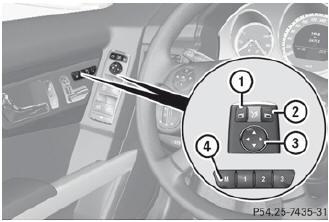
- Make sure that the vehicle is stationary and that the SmartKey is in position 2 in the ignition lock.
- Press button 2 for the exterior mirror on the front-passenger side.
- Engage reverse gear. The exterior mirror on the front-passenger side moves to the preset parking position.
- Use adjustment button 3 to adjust the exterior mirror to a position that allows you to see the rear wheel and the curb. The parking position is stored.
 If you shift the transmission to another position, the exterior mirror on the
frontpassenger side returns to the driving position.
If you shift the transmission to another position, the exterior mirror on the
frontpassenger side returns to the driving position.
You can also store the parking position using memory button M 4.
- Make sure that the SmartKey is in position 2 in the ignition lock.
- With the exterior mirror on the frontpassenger side activated, use adjustment button 3 to adjust the exterior mirror to a position which allows you to see the rear wheel and the curb.
- Press memory button M ? and one of the arrows on adjustment button = within
three seconds.
The parking position is stored if the exterior mirror does not move.
If the mirror moves out of position, repeat the steps.
See also:
How the occupant classification
system works
The Occupant Classification System (OCS)
categorizes the occupant on the frontpassenger
seat by means of a weight sensor.
The front-passenger front air bag is
deactivated automatically for cert ...
Automatic vehicle data retrieval for the
service due date
Your vehicle comes with a function which
improves the servicing of the vehicle
considerably. Shortly before the service due
date, mbrace sends important vehicle
maintenance information to the ...
Gasoline
Fuel grade
You should only refuel with unleaded
premium-grade gasoline as this avoids
damaging the catalytic converter.
If engine running problems are apparent,
have the cause checked immedia ...