
Rear seat head restraints
 WARNING
For safety reasons, always drive with the rear head restraints in the upright position when the rear seats are occupied.
Keep the area around head restraints clear of articles (e.g. clothing) to not obstruct the folding operation of the head restraints.
WARNING
For your protection, drive only with properly positioned head restraints.
Adjust the head restraint in such a way that it is as close to the head as possible and the center of the head restraint supports the back of the head at eye level. This will reduce the potential for injury to the head and neck in the event of an accident or similar situation.
With a rear seat occupied, make sure to move the respective head restraint up from the lowest non-use position and have the occupant adjust the head restraint properly.
Do not drive the vehicle without the seat head restraints installed when the rear seats are occupied. Head restraints are intended to help reduce injuries during an accident.
Adjusting the rear seat head restraint height
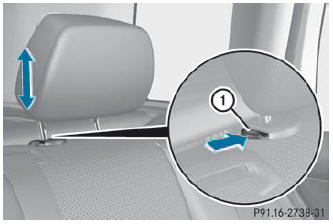
If the head restraint is fully lowered, it is necessary to press release catch 1.
- To raise: pull the head restraint up to the desired position.
- To lower: press release catch 1 and push the head restraint down until it is in the desired position.
See also:
Fuel filler flap emergency release
WARNING
Avoid contact with the vehicle walls as they
may contain sharp edges. Otherwise, you
could injure yourself while releasing the fuel
filler flap.
The emergency release is located in t ...
General notes
The HOLD function can assist the driver in the following situations:
• when pulling away, especially on steep slopes
• when maneuvering on steep slopes
• when waiting in traffic
The vehicle is kep ...
Sport Utility Vehicle
WARNING
This Sport Utility Vehicle is designed for both
on-road and off-road use. It can go places and
perform tasks for which conventional 2-wheel
drive passenger cars are not intended. This ...