
Locking the vehicle (mechanical key)
If the vehicle can no longer be locked with the SmartKey, use the mechanical key.
- Open the driver's door.
- Close the front-passenger door, the rear doors and the tailgate.
- Press the locking button ().
- Check whether the locking knobs on the front-passenger door and the rear doors are still visible. Press down the locking knobs by hand, if necessary.
- Close the driver's door.
- Take the mechanical key out of the SmartKey ().
- Insert the mechanical key into the lock of the driver's door as far as it will go.
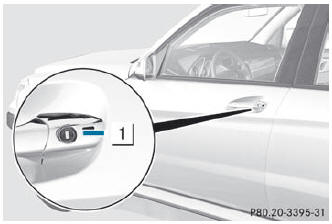
- Turn the mechanical key clockwise as far as it will go to position 1.
- Turn the mechanical key back and remove it.
- Make sure that the doors and the tailgate are locked.
- Insert the mechanical key into the SmartKey.
 If you lock the vehicle as described above, the fuel filler flap is not locked.
The antitheft alarm system is not armed.
If you lock the vehicle as described above, the fuel filler flap is not locked.
The antitheft alarm system is not armed.
See also:
Activating/deactivating
WARNING
Any accumulation of snow and ice should be
removed from the rear window before driving.
Visibility could otherwise be impaired,
endangering you and others.
The rear window defroster h ...
Seat belt adjustment
The seat-belt adjustment function adjusts the
driver's and front-passenger seat belt to the
upper body of the occupants.
The belt strap is tightened slightly when:
• you engage the belt tongue i ...
Warranty
The Service and Warranty Information booklet contains detailed information about
the warranties covering your vehicle.
Your authorized Mercedes-Benz Center will exchange or repair any defective par ...