
Cockpit
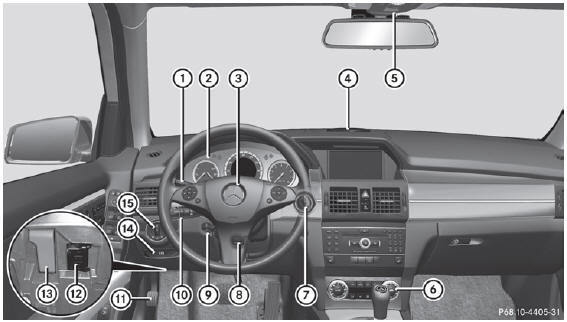
- Cruise control lever
- Instrument cluster
- Horn
- PARKTRONIC warning display
- Overhead control panel
- Operates the climate control system
- Ignition lock
Start/Stop button - Adjusts the steering wheel manually
- Adjusts the steering wheel electrically
- Combination switch
- Parking brake
- On-board diagnostics socket
- Opens the hood
- eleases the parking brake
- Light switch
See also:
Setting the map to the vehicle position,
intermediate stop or destination
position
Centering the map on the vehicle position
To show the menu: press
the COMAND
controller.
Select Position in the navigation system
menu bar by sliding and turning
the COMAND controller a ...
COMAND display
Display overview
The COMAND display shows the function currently selected and its associated
menus. The
COMAND display is divided into several areas.
The radio display is shown in the example.
...
Removing the towing eye
– Loosen the towing eye and unscrew it.
– Attach cover 1 or 2 to the bumper and
press until it engages.
– Place the towing eye in the vehicle tool kit. ...