
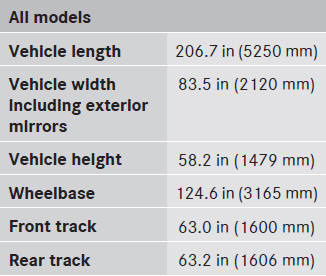
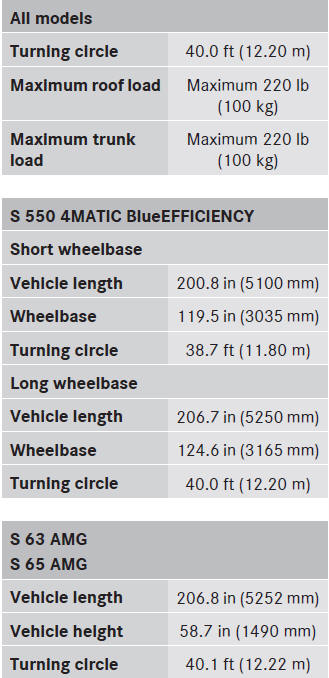
Vehicle data
For the specified vehicle data, please note
that:
• The heights specified may vary due to:
- tires
- load
- condition of the suspension
- optional equipment
See also:
Low outside temperatures
Do not use gasoline to refuel vehicles with
a diesel engine. Never mix diesel with
gasoline or kerosene, as this may result in
damage to the engine or fuel system.
Diesel fuel with improve ...
115 V power socket
WARNING
The 115V AC socket operates at high voltage.
Use the 115V AC socket in the vehicle with
the same caution and prudence that you
exercise when using power outlets at home.
Keep any fl ...
Bag hooks
The bag hook can bear a maximum load
of 6.6 lbs (3 kg). Do not use it to secure a
load.
There is a bag hook in the cargo compartment
on the left-hand side.
– Press the marking on bag ...