
Cleaning Night View Assist Plus
 Never clean the camera lens. When
cleaning the field of vision of the driving
systems, make sure that you do not spray
glass cleaner on the camera lens. If the
camera lens is dirty, visit a qualified
specialist workshop.
Never clean the camera lens. When
cleaning the field of vision of the driving
systems, make sure that you do not spray
glass cleaner on the camera lens. If the
camera lens is dirty, visit a qualified
specialist workshop.
WARNING
Please do not forget that your primary
responsibility is to drive the vehicle. A driver's
attention to the road must always be his/her
primary focus when driving. For your safety
and the safety of others, stop before trying to
remove window fogging or cleaning the
window in front of the Night View Assist Plus
camera.
Bear in mind that at a speed of just 30 mph
(approximately 50 km/h), your vehicle is
covering a distance of 44 feet (approximately
14 m) every second.
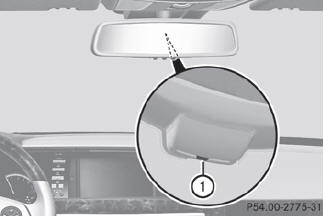
 Fold down the camera cover by recess 1.
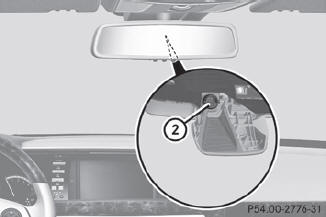
Use a soft cloth to clean the windshield in
front of camera 2.
See also:
Overview of sun visors
WARNING
Do not use the vanity mirror while driving. Keep the vanity mirrors in the sun
visors closed while the vehicle is in motion. Reflected glare can endanger you and
others.
Mirror ...
Starting procedure with the SmartKey
To start the engine using the
SmartKey
instead of KEYLESS-GO, pull the Start/Stop button out of the ignition lock.
Turn the SmartKey to position 3
in the
ignition lock and release it as
so ...
Ashtray in the front-compartment center console
You can remove the ashtray
insert and
use the resulting compartment for
stowage.
The stowage space under the
ashtray is
not heat resistant. Before placing lit
cigarettes in the ashtray, ...