
Lap evaluation
This function is only available if you have stored at least two laps and have stopped the RACETIMER.
 Press
Press  or
or
 on the steering wheel
to select the AMG menu.
on the steering wheel
to select the AMG menu.
Press the  button repeatedly
until the
lap evaluation is shown.
button repeatedly
until the
lap evaluation is shown.
Each lap is shown in a separate submenu.
The fastest lap is indicated by flashing symbol 1.
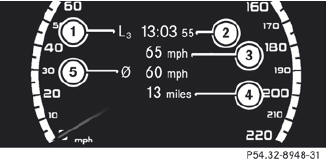
1 Lap
2 Lap time
3 Top speed during lap
4 Lap length
5 Average lap speed
Press the or
 button to select a
different lap evaluation.
button to select a
different lap evaluation.
See also:
Cleaning the headliner and carpets
Roof lining: use soft brushes or dry
shampoo if it is particularly dirty.
Carpets: use carpet and textile cleaners
that have been approved and
recommended by Mercedes-Benz. ...
Important safety notes
WARNING
Make sure the tailgate is closed when the engine is running and while driving.
Among other dangers, deadly carbon monoxide (CO) gases may enter vehicle interior
resulting in unconsci ...
Fuse box in the cargo compartment
► Open the tailgate.
► To open: insert a suitable object, e.g.
a
coin, into the slot of release button 1 on
the cover.
► Turn release button 1 90° in the direction
of the ar ...