
Standard display
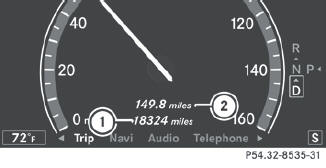
 Press and hold the
  button on
the
steering wheel until the Trip menu with
odometer 1 and trip odometer 2 is
shown.
button on
the
steering wheel until the Trip menu with
odometer 1 and trip odometer 2 is
shown.
See also:
Cleaning the exterior lighting
Clean the plastic lenses of the exterior
lights with a wet sponge and a mild cleaning
agent, e.g. Mercedes-Benz car shampoo or
cleaning cloths.
Only use cleaning agents or
cleaning
...
Cleaning the steering wheel and gear or selector lever
Thoroughly wipe with a damp cloth or use
leather care agents that have been
recommended and approved by Mercedes-
Benz. ...
Vehicle identification plate
Even if you have calculated the total load
carefully, you should still make sure that the
gross vehicle weight rating and the gross axle
weight rating are not exceeded. Details can
be found on ...