
Multifunction display
Values and settings as well as display messages are shown in the multifunction display.
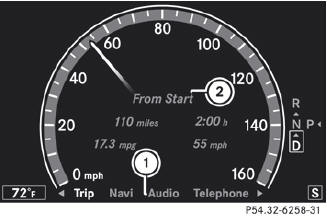
1 Menu bar
2 Description field
See also:
Cruise control lever
1 To activate or increase speed
2 To activate or reduce speed
3 To deactivate DISTRONIC PLUS
4 To activate at the current speed/last stored speed
5 To set the specified minimum distance ...
The mbrace system
The mbrace system provides different
services, e.g.:
• automatic and manual emergency call
• Roadside Assistance call
• MB Info call
To adjust the volume during an mbrace call,
proceed as foll ...
Important safety notes
DSR is an aid to assist you when driving
downhill. It keeps the speed of travel at the
speed selected on the on-board computer.
The steeper the downhill gradient, the greater
the DSR braking eff ...