
Guide lines in the COMAND display
WARNING
Use of rear view camera can be dangerous if
you are color-blind or have impaired color
vision.
Only use rear view camera if you can see and
distinguish all colored guidelines shown by
rear view camera on the COMAND system
display.
WARNING
Please note that objects that do not touch the
ground may appear to be further away than
they actually are, for example:
• the bumper of a vehicle parked behind you
• the trailer drawbar
• the ball coupling of a trailer tow hitch
• the rear end of a truck
• a slanted post
In such cases, you should not use the guide
lines to judge the distance. You may misjudge
the distance, which increases the risk of
impacting the objects.
Even if the object you approach is directly on
the ground, do not approach the object any
closer than the red guide line.
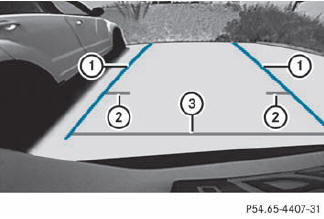
Information in the COMAND display (example)
Guide lines 2 and 3 show the approximate distance to the rear area. Yellow guide line 2 indicates a distance of approximately 3 ft (1 m) and red guide line 3 indicates a distance of approximately 10 in (0.25 m). The distances only apply to objects that are at ground level. Blue guide lines 1 depict the width required for the vehicle. They are used to align the vehicle with the edge of the road, e.g. the curb.
See also:
Belt height adjustment
You can adjust the seat belt height on the driver's seat and the front-passenger
seat.
Adjust the height so that the upper part of the seat belt is routed across the
center of your shoulder ...
Attaching the cargo net
Cargo net attached behind the C-pillar
Insert guide rod 2 into retainer 1 in the direction of the arrow.
Slide guide rod 2 forwards into retainer 1 in the direction of the arrow.
...
Deactivating DISTRONIC PLUS
There are several ways to deactivate
DISTRONIC PLUS:
Briefly press the cruise control lever
forwards 1.
or
Brake, unless the vehicle is stationary.
When you deactivate DISTRONIC PLUS, the ...