
Deactivating/activating PARKTRONIC
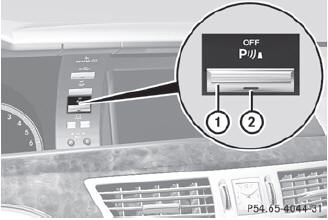
1 To deactivate/activate PARKTRONIC
2 Indicator lamp
If indicator lamp 2 lights up, PARKTRONIC is deactivated.
 PARKTRONIC is automatically activated
when you turn the SmartKey to position 2
in the ignition lock.
PARKTRONIC is automatically activated
when you turn the SmartKey to position 2
in the ignition lock.
See also:
Important safety notes
See the "Important safety notes"
section.
If ESP® detects that the vehicle is deviating
from the direction desired by the driver, one
or more wheels are braked to stabilize the
veh ...
Problems with the sliding sunroof
Problem: the sunroof cannot be closed
and you cannot see the cause.
WARNING
You could be severely or even fatally injured
when closing the sliding sunroof with
increased closing force ...
Adjusting the multicontour seat in the rear compartment
You can use the buttons on the center
console to adjust the multicontour seats for
the outer seats in the rear compartment.
To select a rear-compartment seat: push
or pull rocker switch 1 or ...