
SmartKey
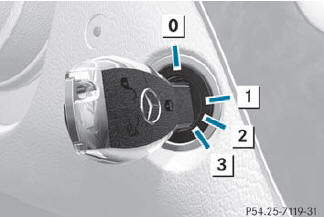
0 To remove the SmartKey
1 Power supply for some consumers, such
as the windshield wipers
2 Ignition (power supply for all consumers)
and drive position
3 To start the engine
 The SmartKey can be turned in the
ignition lock even if it is not the correct
SmartKey for the vehicle. The ignition is not
switched on. The engine cannot be started.
The SmartKey can be turned in the
ignition lock even if it is not the correct
SmartKey for the vehicle. The ignition is not
switched on. The engine cannot be started.
See also:
Wheel and tire combinations
Please bear the following in mind
For safety reasons, Mercedes-Benz
recommends that you only use Tires and wheels which have been approved by
Mercedes-Benz specifically for your
vehicle.
These ...
High-quality materials and strong colour values
The seats in the new Mercedes-Benz M-Class are designed to provide a high
level of comfort on long journeys as well as excellent lateral support. All
important parameters can be electrically adjus ...
Adjusting the four-way lumbar support
You can adjust the contour of the front seat
backrests individually to provide optimum
support for your back.
Adjusting the four-way lumbar support
1 To raise the backrest contour
2 To soften ...