
Setting the center air vents
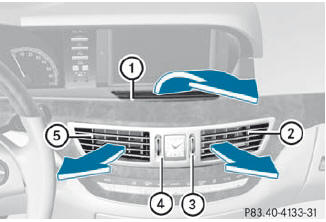
1 Fixed center air vent
2 Center air vent, right
3 Center vent thumbwheel, right
4 Center vent thumbwheel, left
5 Center air vent, left
 To open/close: turn thumbwheels 3
and 4 up or down.
To open/close: turn thumbwheels 3
and 4 up or down.
See also:
Door control panel
1 Opens the door
2 Unlocks/locks the vehicle
3 Adjusts the exterior mirrors
4 Selects the exterior mirror,
electrically folds the exterior mirrors in/out
5 Opens/closes the side window ...
Cleaning the windows
WARNING
Before cleaning the windshield or wiper
blades, switch off the windshield wipers and
remove the SmartKey from the ignition lock.
On vehicles with KEYLESS-GO, press the
Start/Stop b ...
Hiding display messages
You can hide some display messages with a low priority.
Press the or
button on the steering wheel to
hide the display message. The display message is cleared.
Display messages with a hig ...