
Multicontour seat
 Information about the components and
operating principles of COMAND can be
found on.
Information about the components and
operating principles of COMAND can be
found on.
The contour of the driver's seat and frontpassenger seat backrests can be individually adjusted to provide optimum support for your back. This is achieved by controlling the pressure in the air chambers in the multicontour seat.
The adjustments are made using the COMAND display.
When you adjust the multicontour seat,
you may hear the air being pumped in or
released.
You can adjust the following air cushions:
• seat side bolsters
• seat backrest side bolsters
• backrest curvature in the lumbar region
• backrest curvature in the upper back region
 Make sure that the SmartKey is in position
2 in the ignition lock.
Make sure that the SmartKey is in position
2 in the ignition lock.
Press the  function button.
Selecting the seat
You must first select the seat for which you wish to make adjustments.
Press the function button.
The main area is active.
To move to the lower menu bar: select
by sliding  the COMAND controller
and press
the COMAND controller
and press  to confirm.
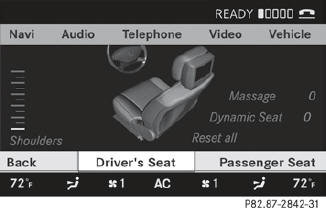
To select a seat: select by sliding
 or
turning
or
turning  the COMAND controller and
press to confirm.
the COMAND controller and
press to confirm.
Exiting a menu
There are several ways of exiting the menu for the multicontour seat:
Press the function button again.
or
Press any function button.
or
Select another main function from the
basic menu.
Display values
Two values are displayed on the setting scale
if you adjust the multicontour seat:
• red: this is the desired value which you
specify when making the setting.
• white: this is the current value. It is changed
gradually until it reaches the desired value.
Adjusting the seat side bolsters
This function allows you to adjust the air cushions in the seat side bolsters.
Select the seat.
Select Seat Sides by sliding
or
turning the COMAND controller and
press to confirm.
A scale appears.
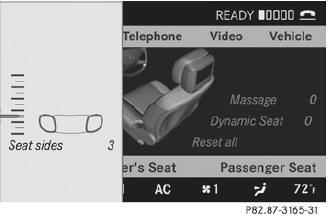
Select Setting by sliding
or turning
the COMAND controller and press
to confirm.
Adjusting the seat backrest side bolsters
This function allows you to adjust the air cushions in the seat backrest side bolsters.
Select the seat.
Select Seatb. Sides by sliding
or
turning the COMAND controller and
press to confirm.
A scale appears.
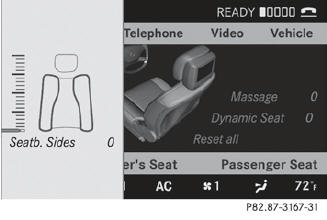
Select Setting by sliding or
turning
the COMAND controller and press
to confirm.
Adjusting the backrest curvature in the lumbar region
This function allows you to adjust the air cushions in the lumbar region of the backrest.
Select the seat.
Select Lumbar by sliding
or turning
the COMAND controller and press
to confirm.
A crosshair appears. You can make two settings:
• Vertical: to move the point of greatest lumbar support up or down • Horizontal: to adjust the amount of support
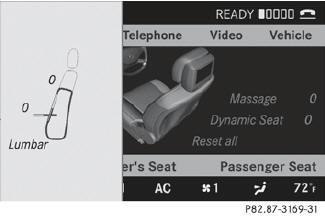
Select Setting by sliding
or turning
the COMAND controller and press
to confirm.
Adjusting the backrest curvature in the upper back region
This function allows you to adjust the air cushions in the upper back region of the backrest.
Select the seat.
Select Shoulders by sliding or
turning the COMAND controller and
press to confirm.
A scale appears.
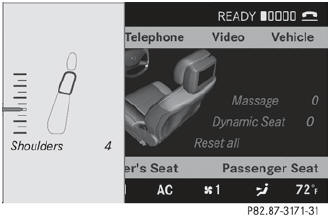
Select Setting by sliding
or turning
the COMAND controller and press
to confirm.
Resetting adjustments
You can reset the seat settings to the factory settings.
Select the seat.
Select Reset All by sliding
or
turning the COMAND controller and
press to confirm.
See also:
Problems with PARKTRONIC
Problem
Possible causes/consequences and - Solutions
Only the red segments
in the PARKTRONIC
warning displays are lit.
You also hear a warning
tone for approximately ...
Ashtray in the front-compartmentcenter console
You can remove the ashtray insert and
use the resulting compartment for
stowage.
The stowage space under the ashtray is
not heat resistant. Before placing lit
cigarettes in the ashtray, make ...
Full programme: ON&OFFROAD package for all eventualities
The ON&OFFROAD package for the new M-Class uses six different driving modes
to optimise driving dynamics and handling safety by providing the optimum drive
control needed to cope with the wide ...