
Opening and closing
 You can continue to operate the sliding
sunroof after switching off the engine or
removing the SmartKey from the ignition
lock. This function is available for up to five
minutes or until the driver's or frontpassenger
door is opened.
You can continue to operate the sliding
sunroof after switching off the engine or
removing the SmartKey from the ignition
lock. This function is available for up to five
minutes or until the driver's or frontpassenger
door is opened.
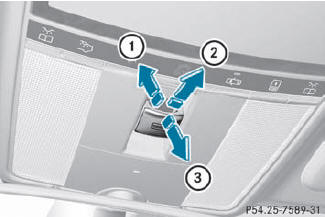
Overhead control panel
1 To raise
2 To open
3 To close/lower
 Turn the SmartKey to position 1 or 2 in the
ignition lock.
Turn the SmartKey to position 1 or 2 in the
ignition lock.
Press or pull the  switch in the
corresponding direction.
switch in the
corresponding direction.
If you press the switch beyond
the
point of resistance, an automatic opening/closing process is started in the
corresponding direction. You can stop
automatic operation by operating the
switch again.
When raising the roof, automatic operation
is only available if the sliding sunroof is in
the closed position.
When opening the roof, automatic
operation is only available if the sliding
sunroof is not raised.
The sun protection cover automatically opens along with the sliding sunroof. You can open or close the sun protection cover manually when the sliding sunroof is raised or closed.
See also:
"Minispare" emergency spare wheel
The "Minispare" emergency spare wheel can
be found in the stowage well under the trunk
floor.
Lift the trunk floor up.
Remove tool kit tray 1.
Turn stowage well ...
Resetting values
► Press the
button on the
steering wheel to select the trip
computer menu.
► Press the
button to select the
function that you wish to reset.
► Press and hold the R reset butt ...
Activating/deactivating Lane Keeping
Assist
You can use the Lane Keeping Assist
function to activate/deactivate Lane Keeping
Assist or Active Lane Keeping
Assist.
Press the or
button on the
steering wheel to select the DriveAssist ...