
Unlocking the driver's door (mechanical key)
If the vehicle can no longer be unlocked with the SmartKey, use the mechanical key.
If you use the mechanical key to unlock and open the driver's door, the anti-theft alarm system will be triggered.
 Take the mechanical key out of the
SmartKey.
Take the mechanical key out of the
SmartKey.
Insert the mechanical key into the lock of
the driver's door as far as it will go.
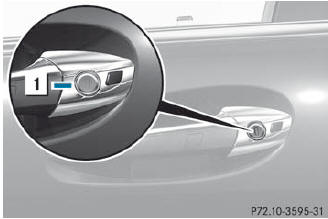
Firmly turn the mechanical key
counterclockwise as far as it will go to
position 1 and hold it in this position.
Pull the door handle quickly.
The locking knob pops up.
The door is unlocked.
Turn the mechanical key back and remove
it.
Pull the door handle again.
Insert the mechanical key into the
SmartKey.
See also:
Checking tire pressure electronically
► Make sure that the SmartKey is in
position
2 in the ignition lock.
► Press and hold the
button on
the multifunction steering wheel until the
standard display appears in the
mu ...
Notes on using 3-zone automatic climate control
The following contains instructions and
recommendations to enable you to get the
most out of your automatic climate control.
• Activate climate control using the
and
buttons. The indicator la ...
Notes for 4MATIC vehicles
Vehicles with 4MATIC must not be towed
with either the front or the rear axle raised,
as doing so will damage the transmission.
If the vehicle has transmission damage or
damage to the fron ...