
Top Tether
Top Tether provides an additional connection between the child restraint system secured with ISOFIX and the rear seat. It helps reduce the risk of injury even further.
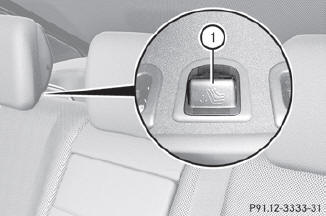
The Top Tether anchorage points are located in the rear compartment behind the head restraints.
 Vehicles with electrically adjustable rear
seats: move the rear seat backrests to an
upright position.
Vehicles with electrically adjustable rear
seats: move the rear seat backrests to an
upright position.
Remove respective covering cap 1 of the
Top Tether anchorage.
Place covering cap 1 in a suitable place
(e.g. in the glove box).
Move the head restraint upwards.
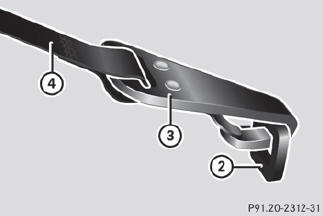
Route Top Tether belt 4 under the head
restraint between the two head restraint
bars.
Hook Top Tether hook 3 of Top Tether
belt 4 into Top Tether anchorage 2.
Ensure that:
• Top Tether hook 3 is hooked into Top Tether anchorage 2 as shown.
• Top Tether belt 4 is not twisted.
• Top Tether belt 4 can move freely between the rear seat backrest and the head
restraint.
Install the LATCH-type (ISOFIX) child
restraint system with Top Tether. Comply
with the manufacturer's installation
instructions when doing so. Make sure that
Top Tether belt 4 is tight.
The child restraint system with Top Tether
belt 4 has been removed:
Slide covering cap 1 onto Top Tether
anchorage 2.
WARNING
Vehicles with rear power seats:
Never change the rear seat position after
installing the child restraint. This could
• damage the child restraint
• introduce undesirable slack or tension into the seat belt
• loosen the child restraint
• misposition the child restraint
All of the above will lessen the
effectiveness of the child restraint and thus
increase the chance or severity of injury in
an accident.
See also:
General notes
When you lock the vehicle, you can simultaneously:
close the side windows
close the panorama roof with power tilt/ sliding panel
On vehicles with a panorama roof with power tilt/sliding panel ...
Automatic interior lighting control
To switch on/off: press
the button.
When the automatic interior lighting
control is activated, the button is flush with
the overhead control panel.
The interior lighting automatically switch ...
Interactive content
DVDs can also contain interactive content
(e.g. a video game). In a video game, you may
be able to influence events by selecting and
triggering actions. The type and number of
actions depend o ...