
NECK-PRO luxury head restraints
 If you have difficulty resetting the NECKPRO
luxury head restraints, have this work
carried out at a qualified specialist
workshop, e.g. an authorized Mercedes-
Benz Center.
If you have difficulty resetting the NECKPRO
luxury head restraints, have this work
carried out at a qualified specialist
workshop, e.g. an authorized Mercedes-
Benz Center.
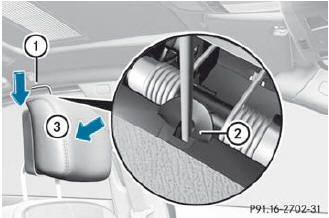
 Remove resetting tool 1 from the vehicle tool kit in the trunk.
Slide resetting tool 1 into guide 2 between the NECK-PRO luxury head restraint
and the rear cover of the head restraint.
Push resetting tool 1 downwards until you hear the head restraint deployment
mechanism engage.
Pull out resetting tool 1.
Firmly press the NECK-PRO luxury head restraint cushion back 3 until it
engages.
Repeat this procedure for the second NECK-PRO luxury head restraint.
Put resetting tool 1 back into the vehicle tool kit.
See also:
Notes on the oil level
Depending on the driving style, the vehicle
consumes up to 0.9 US qts. (0.8 l) of oil over
a distance of 600 miles (1000 km). The oil
consumption may be higher than this when
the vehicle is ne ...
Slippery road surfaces
WARNING
The outside temperature indicator is not designed to serve as an ice-warning
device and is therefore unsuitable for that purpose.
Indicated temperatures just above the freezing point ...
Folding the exterior mirrors in or out automatically
When the "Automatic mirror folding" function
is activated in COMAND:
• the exterior mirrors fold in automatically as
soon as you lock the vehicle from the
outside.
• the exterior ...